
Yeah, hated boiling the eggs every week or so.
Came to the comments to check for this.
Exactly why I opened the comments as well.
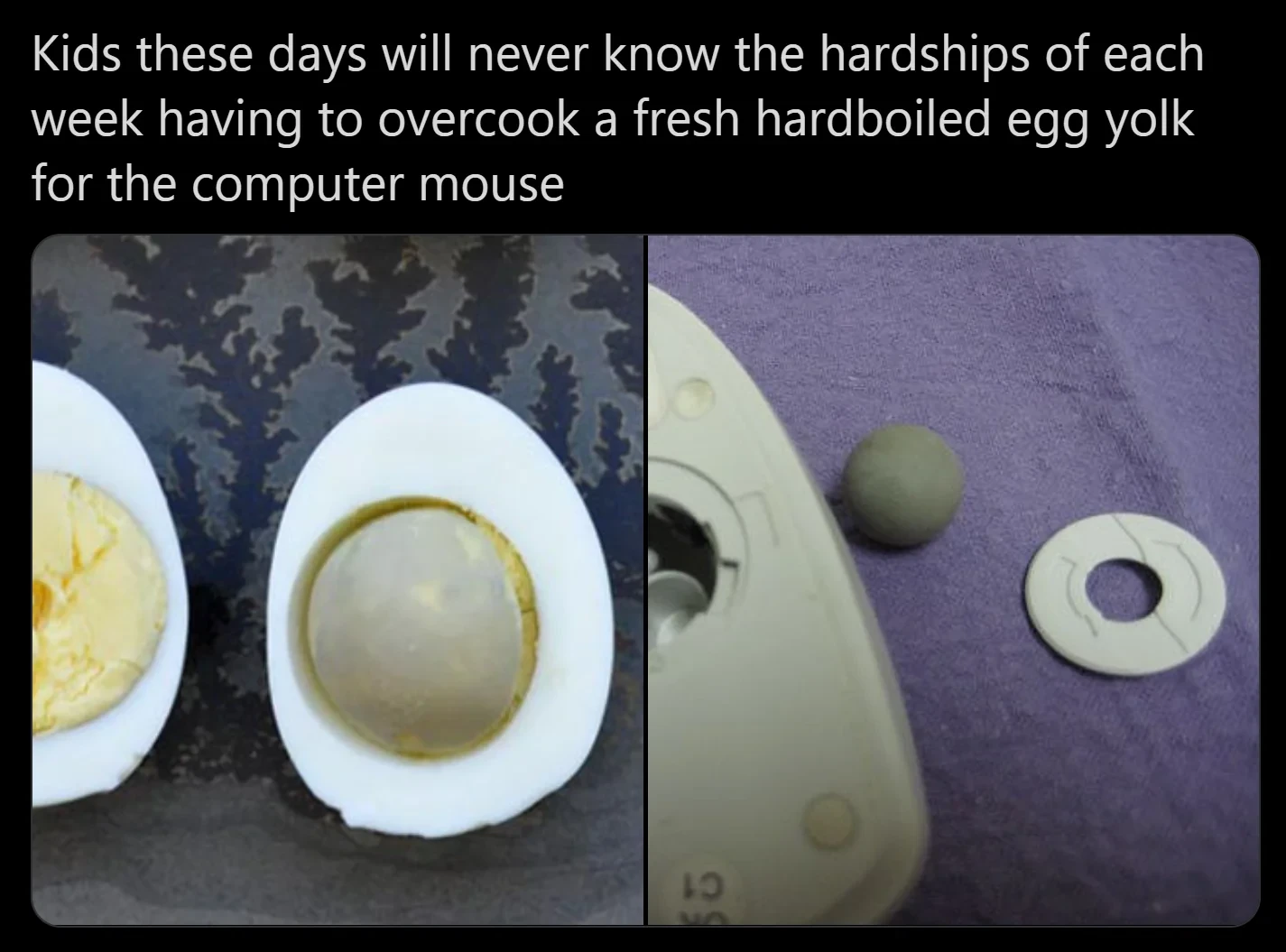
Those balls were usually steel ball bearings with a synthetic rubber wrapped around it. They gave the entire mouse some weight which made the mouse feel better to use. You could clean them with something like soap, but you’d have to be careful not to use anything that messed up the rubber. Some people cleaned them wrong, which caused the rubber to become more sticky and thus get dirty sooner. You’d also risk the rubber becoming harder and not sticky enough, so they would slip a lot. They were basically a pain in the ass and I’m happy we’ve moved on from that.
Got it: be careful when rubbing the balls otherwise they’ll get too sticky or hard
…
Also that everyone in 90s was cupping balls of steel
B-bb-bb-bb-alls of steel.
For me the extra resistance the mass gave against acceleration made it really good for playing first-person shooters.
Some gaming mice these days come with small weights you can put in the bottom to adjust the heft

I have had a G5, G500 and G502 that used weights. That made them nicer. I think there’s probably a bit of a difference between static weights tbat need to be accelerated and a rolling ball that has to start rolling, but I’m not sure. Maybe they are equivalent. I should find a ball mouse and try CS2 with it. 😅
I loved breaking the little dust rolls wrapped around the direction shafts
For a long time I thought those were built-in special rolls.
Yeah man, it was so satisfying
I’d let you rub my direction shaft any time.
My first job was IT Assistant at a manufacturing company. I spent at least 50% of my time cleaning mice.
I used to get to go inside to turn on check and setup the computer lab before school in jr high. Mostly spent cleaning rollers or looking for occasional missing mouse balls.
Got to play too if there was spare time, and it sure beat standing in a prison like asphalt court yard for 30 minutes in the winter dark.
I do. When modern mouses stop working, I feel useless.
These worked on glass. Almost nothing today works on a glass table but these did
I use a thumb-trackball (and have since the 90s). They work on glass. Hell, they work on my lap or beside me if I’m in bed. And no space needed to move around.
Every week or two I pop the ball out and give it a quick wipe with a lenscloth.
Preach the good word, partner
I love my thumb-trackball. Doesn’t matter where I use it, it will always work.
I used these religiously until the carpal tunnel from phone scrolling set in
Are you an adult by night?
This comment made me curious so I tested the two mice I use regularly.
My Logitech G502 tracks very poorly on glass and is basically unusable.
My MX Anywhere 2S lives up to its name and seems to track perfectly fine.
I use a mouse pad, it works pretty well.
I have a “magic trackpad” from apple on a side table to use when I’m watching or reading something and recline too much to reach the mouse.
It’s nice (and with some free driver I found can do multi touch on windows), but for some reason it had a battery (despite having a fixed usb cable) which pillowed up making it unusable until I literally ripped it off (damn thing had more glue than battery).
Obviously works fine without the battery, which I assume is just an attempt at extremely inefficient planned obsolescence, but I wouldn’t recommend it, too much of a fire hazard if you don’t notice the trap.
At least you know wired mice won’t blow your hand up, and I value that more than the convenience.
When I have to lower myself to the filthy gutter of having to use the mouse at all, I feel like an itchy scrotum in need of a lye bath.
keyboard master race
These balls were so satisfying to handle.
Mine are too
Nah, if I handle yours like an oldschool mouseball, you get all screamy. Really ruins the mood.
Never washed the ball. I did clean out the runners inside though. They hid away dead skin grime and pet fur better than any keyboard ever will.
Edit: I give my work keyboard a tip and tap once a week or so and have been asked why I do it. I explained it’s basically a hygeine thing, explaining why, and was told it’s disgusting. Encouraged colleagues to do it and they were mortified with the mess left on their desks. It was like they just dealt with the consequences of opening up their car engine after neglecting to oil change for 150,000 miles.
WHO’S DISGUSTING NOW???
They can try take the high road, but I’ve seen how many icons are on their desktops, so I basically know how messy their bedroom floor is.
Rick: “Your boos mean nothing, I know what apps you use!”
I use an air compressor to clean out my personal keyboard. Good reminder to do it at work tomorrow for my work one, too.
You all are making me feel ancient.
Now let’s talk about losing the ball and having to fish it out from under the fridge.
I use a trackball and clean mine every few days. It just takes a quick swipe of the rollers though no soap or anything crazy.
The image doesn’t show the fingernail scrape technique on the wheels that the ball drives. That cotton swap isn’t going to get that off you need some elbow grease and a fingernail!
Satisfying and gross at the same time.
Actually using a standard cheap mouse on a desk without a mousepad will generate the same crap along the pads, it doesn’t come off so crisply but reminds me of this every time.
Any fingernail?
Preferably a toenail.
I have a trackball. I still clean it once a week. I’ve never washed the ball itself though. Maybe roll it across my shirt. I just take a pencil eraser to the rollers in the ball cavity.
There’s no mouse I’d rather have. Being a Mac user, I mean, almost every mouse is better than Apple’s. I’m not even talking about the charging port on the bottom. Charge it at night when you’re not using it, it doesn’t matter. It’s just ugly and looks uncomfortable to use. Now the Magic Trackpad… yeah, I could get used to that. But I’d rather have my trackball when precision matters.
Being a Mac user, I mean, almost every mouse is better than Apple’s. I’m not even talking about the charging port on the bottom
fucking… “It just worksTM” my ass.
“It just works” was always bullshit marketing drivel. Even long-time Mac users didn’t swear by it. No computer “just works.” They all have a learning curve. Most of them make dumb-ass decisions. I like Macs, but it’s not like Macs are perfect and PCs are complete dogshit. I use a Windows 11 machine at work and I enjoy working with it for the most part. (To be fair, Copilot is disabled by IT, so it’s not full fat Windows 11.) I do like my Mac more, but there are some things Windows machines do better. By the same token, yeah, it kind of does just work, but so does Windows. So does Linux. So does Android. Your computer/device doesn’t get brownie points for doing its fucking job. It gets brownie points for the things that make you miss it when you’re using another one. And they all have those.
thank you for your good reply.
Just stupid thoughts; years ago I’d have tried to talk about how shit OSX is and maybe stick to windows or move to linux. With your great post and the current OS landscape, I have no fucking idea what my opinion is anymore.
For people using open-source software, MacOS is not much worse than Linux. It’s FreeBSD under the hood with a solid GUI on top, very automateable. There are lots of open-source utils for tuning the GUI, just like in Linux one needs specific programs to do particular things with the UI. Iirc there’s even a tiling wm.
Moreover, Mac has some productivity software that’s way better than anything on Linux or Windows. Namely Alfred and Hammerspoon.
And of course, you know that the drivers will never give up on you after an update.
The way MacOS has been explained to me is “you pay for it to just work”, I.e. no random driver issues after an OS update or stuff breaking. I’ve never used it and I can’t stand Apple, but I understand why people who need it for work prefer it over Windows or Linux. Windows has been particularly bad with updates breaking the most basic shit and producing bizarre bugs, and I genuinely wish I didn’t have to use it for work. My Fedora has unironically been more stable and consistent than Windows.
I’m also a bit into UI design, so I have the questionable capability of seeing where each OS has effort put into its UI. When I first tried MacOS in a VM, I saw right away that it was made for people and not some abstract users. Apple’s designers actually know more than a little about design, while MS struggles with basic stuff like the principles of grouping. (How basic? Well you can make a good design in black and white with just these principles and nothing else.) Microsoft’s design paradigm since the nineties until Win10 was to cram as much stuff as possible onto the screen, with no regard to how people will have to use that.
And naturally, the control panel, the litmus test of an OS’ design, had ten different styles of windows in Windows 7. And two entirely different control panel designs in Win10.
With Linux, of course, it’s a toss as to whether any given environment has some design sense. KDE started as ‘Windows, but even more so’: they’ve managed to be even more busy with hundreds of options and dialogs. Gnome 2 unabashedly stole good stuff from MacOS, until they threw it all away in Gnome 3. Cinnamon still lacks some little details that make MacOS so damn good: e.g. the fact that you can adjust the volume in 1/4th increments in Mac by pressing alt-shift and volume up/down.
MacOS is actually great if you treat is as a desktop environment and nothing else. Buy a used Macbook Pro, don’t buy other Apple devices, don’t use the ‘Apple ecosystem’, just use the same open-source apps that you would in Linux or Windows, plus some more for tweaking the UI, and a couple paid apps that are better than alternatives. You get a rock-solid DE.
It comes down to what a person needs to do, what they may need to do, their comfort level with learning, what they’re used to, and any other requirements.
Average person I’m not putting on Linux of any flavor. But someone asks me for a special use-case (e.g. old laptop), or expresses interest in doing something beyond average user things (like some form of self-hosting) then I may suggest a Linux distro.
To be fair back in the early days of Mac vs Windows 3.X, “It just works” had a lot more relevance.
For the average user, it did just work more than Windows. Though I crashed Macs as much as I did Windows boxes back then.
I appreciate what Apple was trying to do despite their approach. Finding anything in the UI beyond the basics was painful (intuitive my ass).
But after NT4 (and especially Win2k), that difference was gone.
Ironically MS make some great peripherals. The Sculpt ergonomic keyboard is pretty good, and when I inevitably break some keys trying to clean them, I unpack old reliable Natural 4000 and clack away again.
peepShowErgonomicManagementKeyboard.jpg

Btw, I probably mentioned this elsewhere: MS Natural’s humongous alt keys, mapped to the main modifier cmd in Mac, are a revelation. I’m not having ctrl under the pathetic pinky finger in Linux or Windows ever again.

I’m not having ctrl under the pathetic pinky finger in Linux
in KDE :

Yeah, I’ve already set that up on my system — although Cinnamon doesn’t allow some more complex setups, seemingly just like KDE. Gonna have to look into xkb remapping.
Mac is again ahead here, because open-source Karabiner allows arbitrary mappings and different mappings per keyboard (e.g. built-in vs external ones).
although Cinnamon doesn’t allow some more complex setups, seemingly just like KDE.
No idea how to help…
Well, I still use trackball mice for my day job sooo.
Although I didn’t wipe the balls because it’ll get rid of my sweet sweet skin oil buildup.
Btw, why was there a ball, not just a horizontal and vertical wheely on the base?
The first computer mouse did have two wheels

Wait, is that wheel for scrolling?
That’s the bottom of the mouse
Oh.
Wait, are those bite marks on the other wheel?
deleted by creator
Mostly the fact that it can only move in 2 directions.
But 2D space has only 2 directions. ↔, ↕ and everything inbetween. I mean, use 2 wheels, 90° angled.
Set up two wheels and try to drag them diagonally, see what happens.
And that way? \↑/
But ok, i guess it is either too scratchy on fabric or too less grip on smooth surfaces.
Imagine trying to move that mouse in a circular motion
Yeah, that’s the way I mean. If the wheels in your figure there were at 90° angles, it wouldn’t work at all. The very best case scenario would be that it would input up then right over and over the whole time you’re dragging.
It’s the everything in between where you get problems
Because the ball rolls smoothly in any direction. The wheels do not roll at all parallel to their axles, they just slide which is not as smooth.
Just wheelies wouldn’t be able to handle diagonal movement. The mouse would kind of scrape as it tried to move in non-aligned directions.
you would drag one of the wheels regardless of direction. This also happens with ball mice, but you don’t notice becase the wheel dragging is tiny and made to be a little bit slippery… which is also part of why they need to be cleaned every so often
Did anyone actually clean their mice like this?
Id get in there with my child fingers and scratch the wad of gunk off. Usually id end up wedging it in the housing but thats my dad’s problem.
Yeah, you kinda had to at a certain point, the gunk would inhibit the ball from rolling freely.
There was always a kind of lint that would develop on the wheel inside. I’ve got no idea what it was made out of.
Usually just actual lint and dust. You’d have to kinda crack break it off then sprinkle it on the floor or blow it into the air on your friend sitting next to you.
Or make a secret ball collection and the school would panic.
I remember cleaning the ball once or twice, yes, when it got too bad to ignore.
Mostly the gunk accumulated on the rollers, though (and under the mouse, like in optical ones), and that was easier and faster to just scratch off with your nail… except for the little third wheel (seen on the bottom left picture) that kept the ball centered, of course, because that one wasn’t only smaller but on a spring, making it almost impossible to scratch the gunk off of.
There was also the occasional hair tangled up on a roller, of course, which was almost impossible to remove. Those you just pushed aside onto the roller’s axle and hoped the mouse would die of some electrical failure before the poor thing got too full of hair to roll.
Yes.
Scratch blow close 9/10. (With a personal mouse. Computer lab mice had clearly seen some things and needed the alcohol.)